One thing that will always be present in the blogging world is a debate about which platform is the best. It seems like the three most popular platforms out there right now are Blogger, WordPress, and Squarespace, and every blogger has their opinion on each! It’s been about six months since I made the switch from Blogger to WordPress, so I finally feel like I have enough experience with both to write a post about that change. Rather than pushing the “everyone needs to switch to WordPress now!” speech on you though (because that’s definitely not true), I want to share the reasons why I made the switch so that you can decide for yourself whether this experience is what you’re looking for in a platform.
1. Absolute Freedom Of Design
My main reason for switching to WordPress was that I wanted more design options. I love tweaking my theme and finding new features to add, and on WordPress you can do literally anything you want to your design. If I wanted an image slider, I could add one. If I wanted a home page, I could make that too. There’s no, “oh, that’s not actually possible here”. If you can picture it, you can have it. Of course there’s some work that goes into creating those things, and some edits require quite a bit more development knowledge than others, but here’s a secret for you: all of the changes I’ve made to my blog have been done through tutorials and research. WordPress isn’t new, and people have been messing around with theme development for years, so tons of great resources have made their way online that can teach you how to do almost anything you want.
A huge myth I hear about WordPress is that it’s only for web developers or people that want to learn how to develop. While WordPress is great for them, that’s totally not true! Ironically, because so many web developers are attracted to WordPress, it’s actually easier for non-developers to customize their design, given they find a great theme. That’s because unlike Blogger where there’s a preset customization screen that only lets you do a few edits (fonts, colors, spacing, etc.), WordPress has a customization interface that a developer can change to allow the user of their theme to make all sorts of edits. For example, if a developer wants their user to be able to have a sticky navigation bar, they can add an option that lets the user create that with the click of a button.
2. A Cleaner Admin Interface
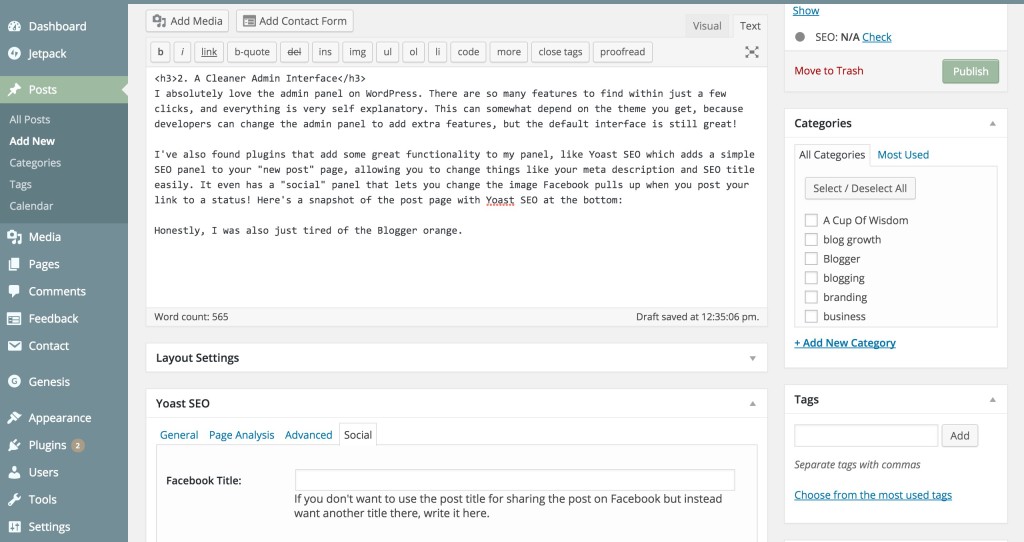
Like basically all bloggers, I spend a lot of time in the background of my blog, aka the admin panel. This is more of a benefit from switching rather than a reason I did, but I have to say, I absolutely love the admin panel on WordPress. There are so many features to find within just a few clicks, and everything is very self explanatory. This can somewhat depend on the theme you get, because developers can change the admin panel to add extra features, but the default interface is still great!
I’ve also found plugins that add some great functionality to my panel, like Yoast SEO which adds a simple SEO panel to your “new post” page, allowing you to change things like your meta description and SEO title easily. It even has a “social” panel that lets you change the image Facebook pulls up when you post your link to a status! Here’s a snapshot of the post page with Yoast SEO at the bottom:
Honestly, I was also just tired of the Blogger orange.
3. It’s Easier To Be A More Professional Blogger
No, switching to WordPress doesn’t make you a more professional blogger, but switching can make it easier to become one. Generally, a “professional” blog (because what really even is that):
- Has a custom domain.
- Is organized well.
- Has a clean design.
All of these things are easy to implement in WordPress. A custom domain is required when you’re using self-hosted WordPress, so that’s one! As for organization, I’ve found the WordPress category/tag system to be extremely helpful with sorting all of my posts, compared to Blogger’s tag system. It’s easy to create pages based off those categories, which is what the links in my navigation bar connect to. The media page on WordPress is also a life-saver that handles all of your picture organization. For example, changing the description or alternate text for your image is as easy as going into the media tab from your admin panel, selecting the picture you want, and filling out some blanks.
Clean design is obviously something available on Blogger, so I’m not saying you can’t get a professional, clean design there. But unless you hire a designer, it may not be as easy to find one that looks the way you want it to. On WordPress, the number of developers constantly pushing out fresh designs means there are hundreds of thousands of designs to choose from. That also means that you’ll be searching through more recently created designs, filled with trending layouts and features. Basically, it’s just easier to find a theme that you like when there are more to choose from!
4. The Future Of My Blog Is Limitless
Right now, my blog is just a blog. It’s the same blog it would be if I were writing this on Blogger. But what if someday I want to add a shop to my blog? Or a business page? Or an e-course page? On Blogger, that’s technically possible, but your options are very limited when it comes to designing those pages and getting them to work the way they should. On WordPress, you aren’t just limited to a blog page and other “pages” that are really just more typed up content. You can create any layout you want, and add any functionality you want, as if starting from a blank canvas. I like knowing that if at any time I decide I want one of these pages (or anything else for that matter), I have the resources to do so on my current blog.
FAQ’s
Doesn’t it cost a lot of money to blog on WordPress?
The cost of using WordPress comes down to two main payments—hosting and a domain. I host through Bluehost, which can cost as low as $4 a month for one website. I use their Plus plan, which is about $9 a month. When you add up two or three years worth to make your payment, it will feel like a lot, but think about it this way—that’s basically the cost of a single lunch out. So if you really feel bad about it, just go out to lunch one day less than you usually do. As for the domain, that can range from $5-$25ish dollars a year, which is much less and definitely worth the cost.
Where did you get your design?
I’m using the Genesis Framework with the Fun theme, which I customized using tutorials and lots of experimenting with code.
Should I switch to WordPress?
Are you not happy with where you’re at right now? Then go for it! It’s just a blog, after all. :)
Where can I find a good WordPress theme?
I love themeforest.net and elegantthemes!
Will I lose my posts if I switch over?
Nope! So many people switch over from Blogger to WordPress that there’s a special plugin just for transferring your content. It’s super easy to use and I had no issues!
If you have any other questions about WordPress, feel free to ask in the comments! I want to put together a longer WordPress FAQ post soon, so it’d really help me out!
- Twitter 1
- Facebook 0
- Pinterest 3
- StumbleUpon 0
