The post How To Start A WordPress Blog appeared first on The Blogging Brew.
]]>Whether you’re transitioning from another blogging platform or creating a blog for the first time, starting a blog on WordPress can be a bit confusing. There’s a good chance you haven’t used hosting before, or even a custom domain name. Don’t worry though, I’m going to give you all the steps you need to start a WordPress blog in just a few minutes using Bluehost, my host of choice!
I chose Bluehost for several reasons. Initially it was because so many of my blogging friends were using them, and I figured they must be good if they have the trust of all these amazing bloggers! After some research though, I learned about some other great benefits:
- Bluehost offers great hosting for a very reasonable price at less than $5 a month.
- Their customer support is fantastic! I always hear back within a few hours when I send in a ticket, and it took less than 5 minutes for me to hear back from a DM I sent to their Twitter support team.
- WordPress has recommended Bluehost as a great host for their platform; it doesn’t get more trustworthy than that!
1. Setting Up Your Domain + Hosting
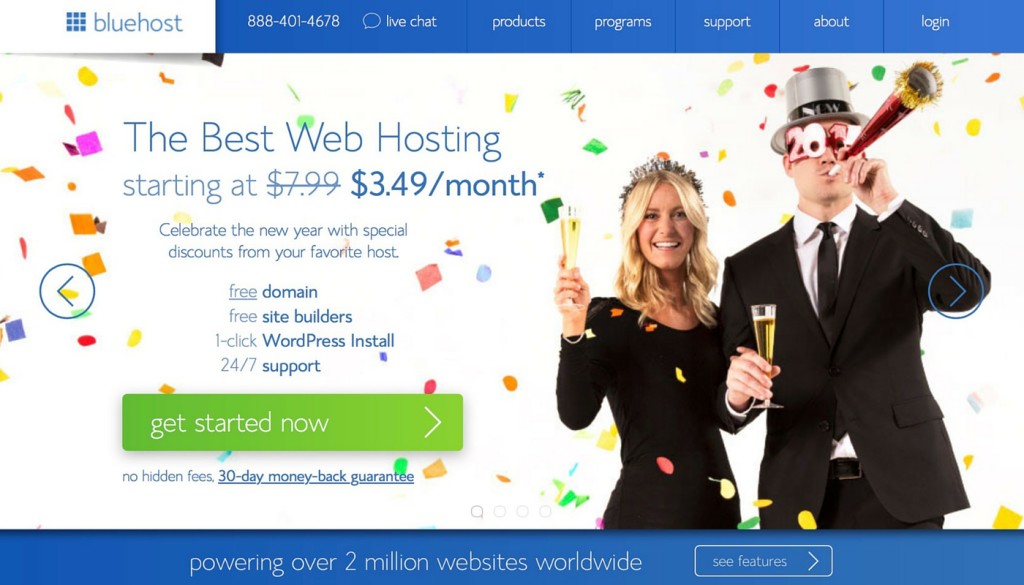
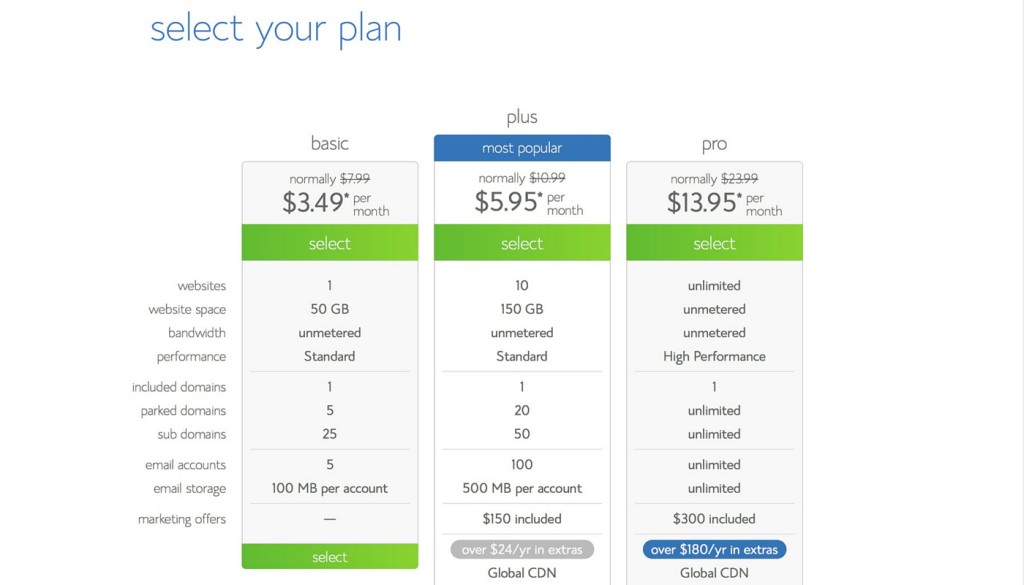
After heading to the Bluehost website, click on the get started now button. If you’re only planning to have one website (your blog), all you need is the Starter plan. I went with the Plus plan, but only because I’m hosting multiple websites!
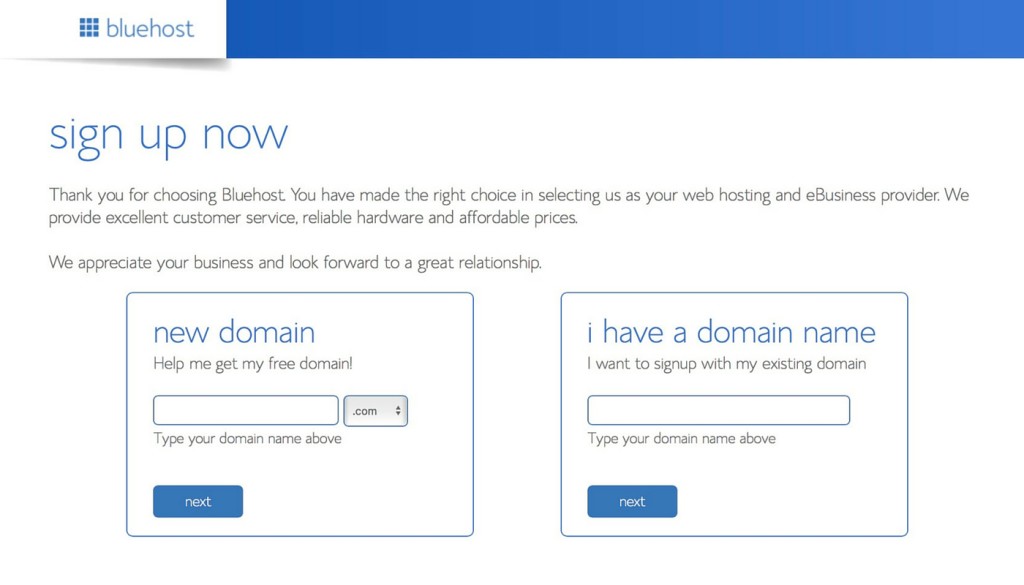
Now you’ll need to choose a domain name. If you haven’t made one yet, Bluehost will let you create one for free!
Within the package information, there are a few add-ons you can purchase. I only selected the Domain Privacy Protection, but SiteLock Security and Site Backup Pro are other great choices for extra security!
You’ll also be able to choose how many months of hosting you’d like to pay for. The more months you select, the cheaper the monthly rate is, so if you feel confident that you’ll be sticking on WordPress for a while, I’d recommend paying for more than a year!
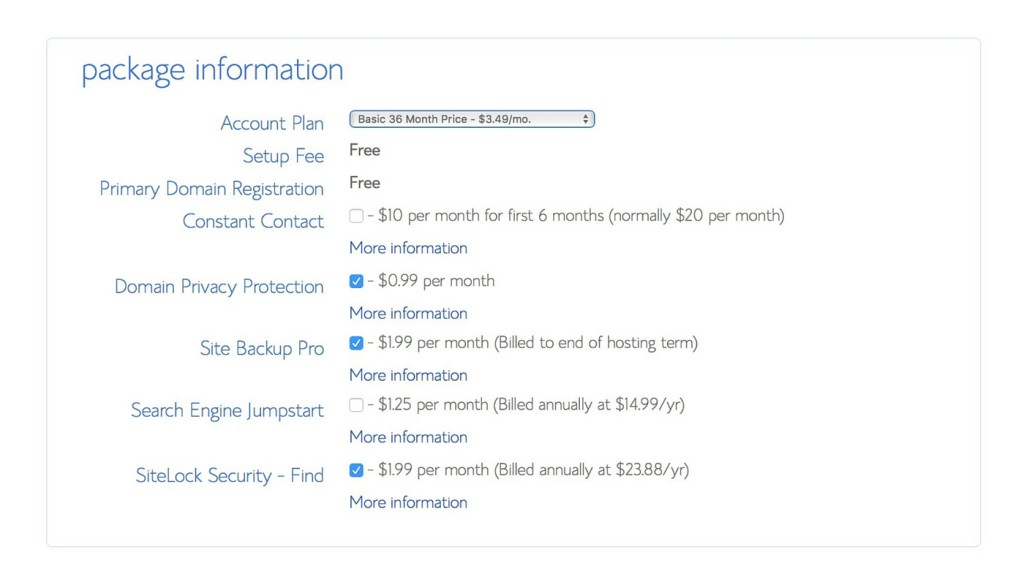
After filling out the package information, you can follow the rest of Bluehost’s instructions to complete your purchase.
2. Installing WordPress
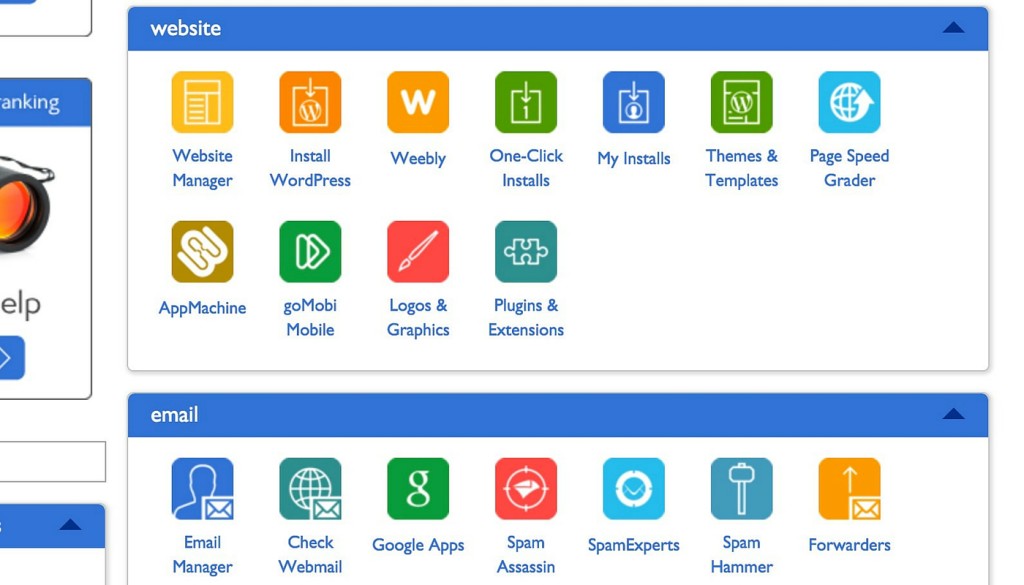
Head to your Bluehost dashboard or cpanel and select Install WordPress. On the next page, choose Install from the area that advertises free installation.
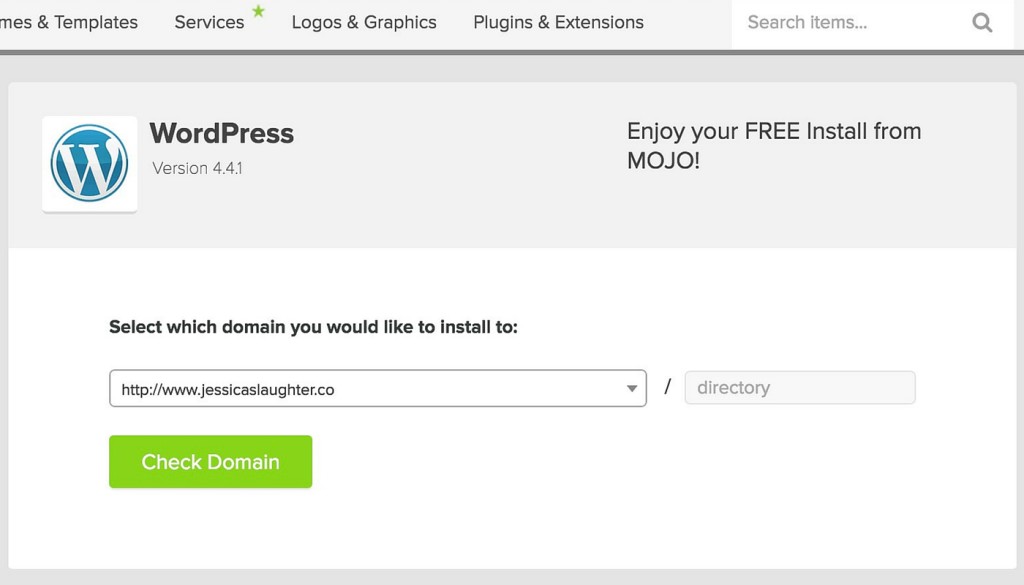
Select the domain you want to install WordPress on (if you have multiple websites), and click Check Domain. You only need to add something to the text box if you’re planning to install WordPress on a separate page, like mywebsite.com/blog, but generally you can leave that part blank!
Open the advanced options section and fill out your information, then click Install Now.
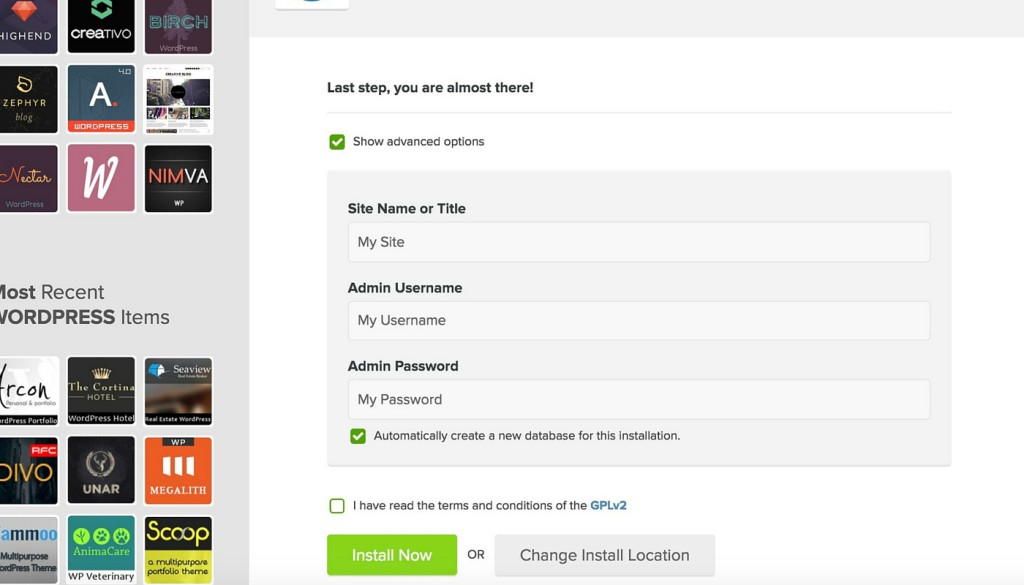
You’re done installing WordPress! Just wait for the installation to complete, and you should be sent an email with all of your installation credentials. Make sure you keep this or write down the information somewhere.
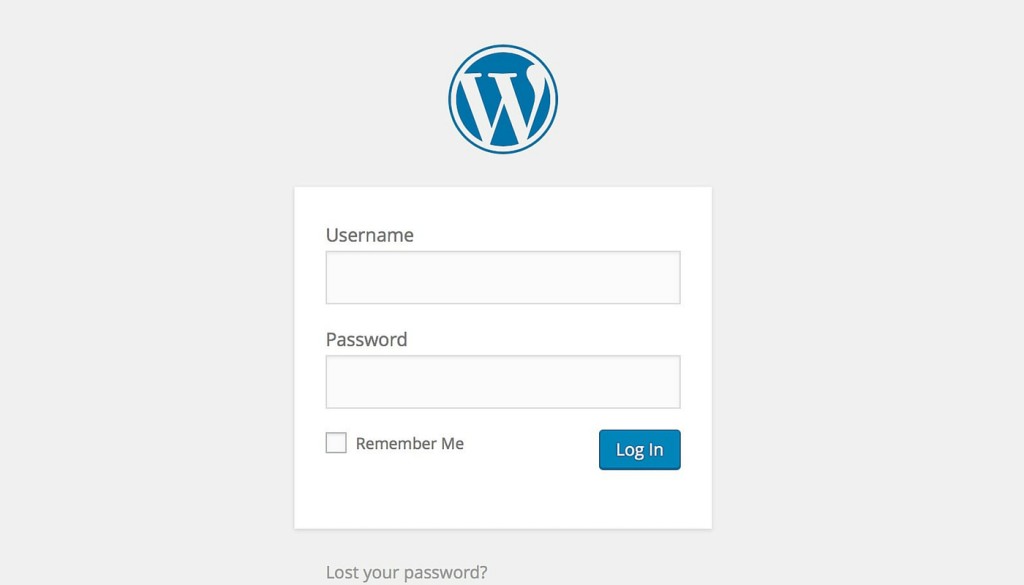
To login to your new website, visit your WordPress dashboard by going to http://www.yourdomainname.com/wp-admin. You’ll be visiting this page a lot, so I’d recommend bookmarking it!
3. Set Up Your Design
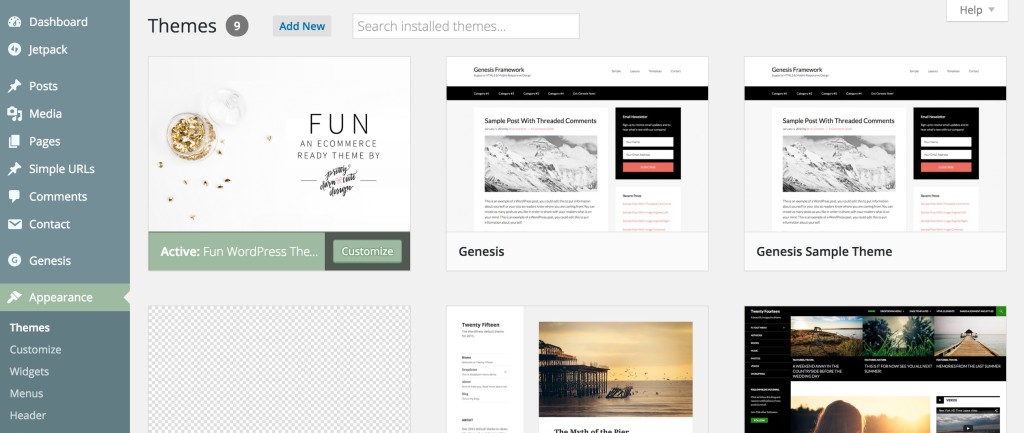
Now that WordPress is installed on your site, it’s time to make it look good! Find a theme that will best display your content and meets your needs. I’d advise against using a free theme you found somewhere online, as these often have bad code and can cause you problems in the long run. I’m using a customized version of the Fun theme on the Genesis Framework!
To install your theme, go to your WordPress dashboard and head to Appearance > Themes. Select Add New and then Upload Theme. Upload the .zip file for the theme you chose, and click Install Now.
Your WordPress blog is now live! Head to your domain to see it in action. To get you started, here are some posts you might want to check out:
Investments Worth Making For Your Blog
How To Make The Most Of Your Sidebar
How To Make A Custom MailChimp Signup Form On Your Blog
Ways To Make Money For Your Blog
If you’ve set up your own blog on WordPress, leave me a link in the comments below so I can check it out! ☺️
Disclaimer: Some of the links used in this post are affiliate links, meaning I’ll make a commission if you make a purchase using them. I only use affiliate links for products that I have experience with. There’s no additional cost to you for using them!
The post How To Start A WordPress Blog appeared first on The Blogging Brew.
]]>The post 4 Reasons Why I Switched To WordPress appeared first on The Blogging Brew.
]]>One thing that will always be present in the blogging world is a debate about which platform is the best. It seems like the three most popular platforms out there right now are Blogger, WordPress, and Squarespace, and every blogger has their opinion on each! It’s been about six months since I made the switch from Blogger to WordPress, so I finally feel like I have enough experience with both to write a post about that change. Rather than pushing the “everyone needs to switch to WordPress now!” speech on you though (because that’s definitely not true), I want to share the reasons why I made the switch so that you can decide for yourself whether this experience is what you’re looking for in a platform.
1. Absolute Freedom Of Design
My main reason for switching to WordPress was that I wanted more design options. I love tweaking my theme and finding new features to add, and on WordPress you can do literally anything you want to your design. If I wanted an image slider, I could add one. If I wanted a home page, I could make that too. There’s no, “oh, that’s not actually possible here”. If you can picture it, you can have it. Of course there’s some work that goes into creating those things, and some edits require quite a bit more development knowledge than others, but here’s a secret for you: all of the changes I’ve made to my blog have been done through tutorials and research. WordPress isn’t new, and people have been messing around with theme development for years, so tons of great resources have made their way online that can teach you how to do almost anything you want.
A huge myth I hear about WordPress is that it’s only for web developers or people that want to learn how to develop. While WordPress is great for them, that’s totally not true! Ironically, because so many web developers are attracted to WordPress, it’s actually easier for non-developers to customize their design, given they find a great theme. That’s because unlike Blogger where there’s a preset customization screen that only lets you do a few edits (fonts, colors, spacing, etc.), WordPress has a customization interface that a developer can change to allow the user of their theme to make all sorts of edits. For example, if a developer wants their user to be able to have a sticky navigation bar, they can add an option that lets the user create that with the click of a button.
2. A Cleaner Admin Interface
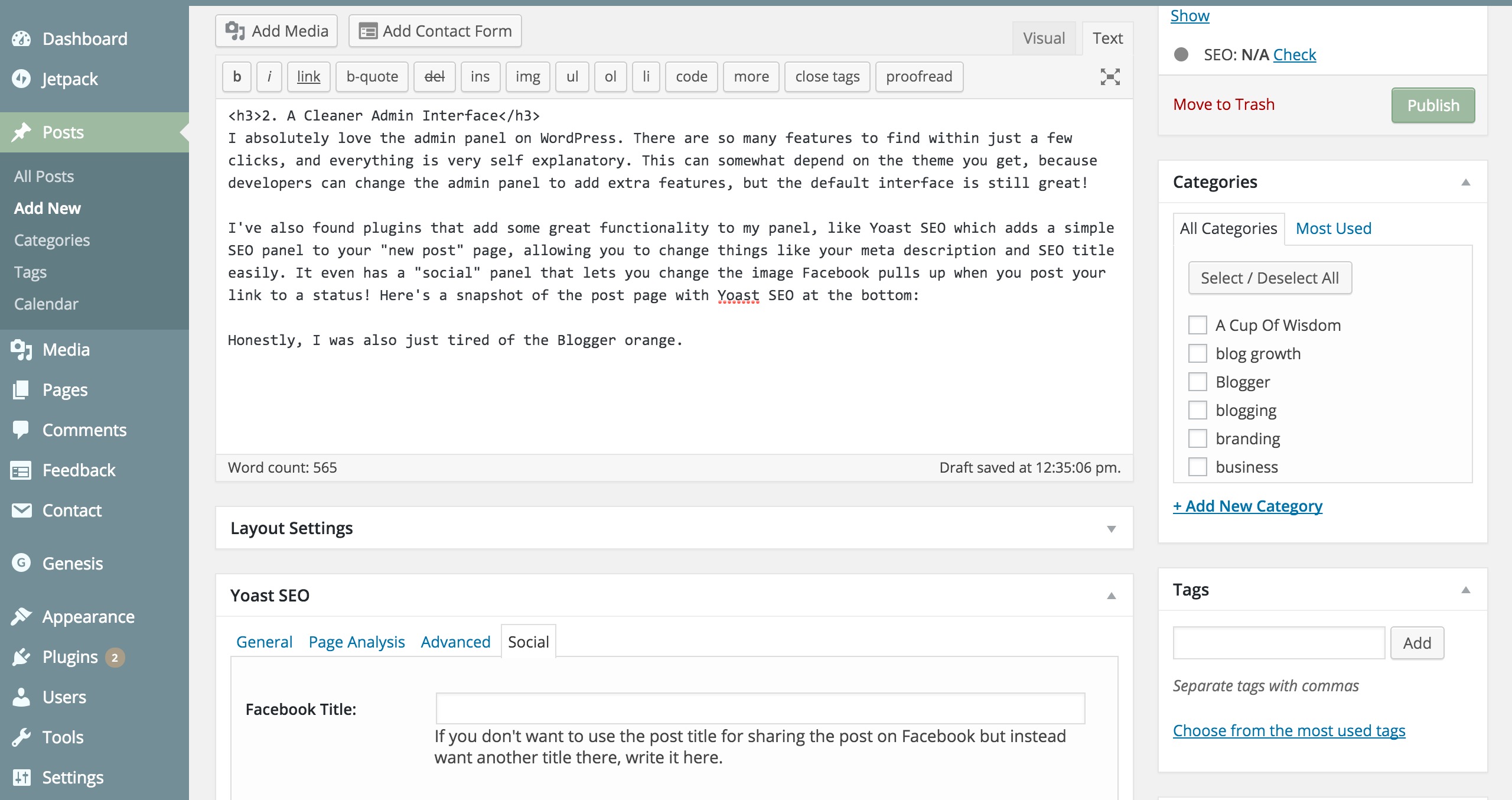
Like basically all bloggers, I spend a lot of time in the background of my blog, aka the admin panel. This is more of a benefit from switching rather than a reason I did, but I have to say, I absolutely love the admin panel on WordPress. There are so many features to find within just a few clicks, and everything is very self explanatory. This can somewhat depend on the theme you get, because developers can change the admin panel to add extra features, but the default interface is still great!
I’ve also found plugins that add some great functionality to my panel, like Yoast SEO which adds a simple SEO panel to your “new post” page, allowing you to change things like your meta description and SEO title easily. It even has a “social” panel that lets you change the image Facebook pulls up when you post your link to a status! Here’s a snapshot of the post page with Yoast SEO at the bottom:
Honestly, I was also just tired of the Blogger orange.
3. It’s Easier To Be A More Professional Blogger
No, switching to WordPress doesn’t make you a more professional blogger, but switching can make it easier to become one. Generally, a “professional” blog (because what really even is that):
- Has a custom domain.
- Is organized well.
- Has a clean design.
All of these things are easy to implement in WordPress. A custom domain is required when you’re using self-hosted WordPress, so that’s one! As for organization, I’ve found the WordPress category/tag system to be extremely helpful with sorting all of my posts, compared to Blogger’s tag system. It’s easy to create pages based off those categories, which is what the links in my navigation bar connect to. The media page on WordPress is also a life-saver that handles all of your picture organization. For example, changing the description or alternate text for your image is as easy as going into the media tab from your admin panel, selecting the picture you want, and filling out some blanks.
Clean design is obviously something available on Blogger, so I’m not saying you can’t get a professional, clean design there. But unless you hire a designer, it may not be as easy to find one that looks the way you want it to. On WordPress, the number of developers constantly pushing out fresh designs means there are hundreds of thousands of designs to choose from. That also means that you’ll be searching through more recently created designs, filled with trending layouts and features. Basically, it’s just easier to find a theme that you like when there are more to choose from!
4. The Future Of My Blog Is Limitless
Right now, my blog is just a blog. It’s the same blog it would be if I were writing this on Blogger. But what if someday I want to add a shop to my blog? Or a business page? Or an e-course page? On Blogger, that’s technically possible, but your options are very limited when it comes to designing those pages and getting them to work the way they should. On WordPress, you aren’t just limited to a blog page and other “pages” that are really just more typed up content. You can create any layout you want, and add any functionality you want, as if starting from a blank canvas. I like knowing that if at any time I decide I want one of these pages (or anything else for that matter), I have the resources to do so on my current blog.
FAQ’s
Doesn’t it cost a lot of money to blog on WordPress?
The cost of using WordPress comes down to two main payments—hosting and a domain. I host through Bluehost (my affiliate link), which can cost as low as $4 a month for one website. I use their Plus plan, which is about $9 a month. When you add up two or three years worth to make your payment, it will feel like a lot, but think about it this way—that’s basically the cost of a single lunch out. So if you really feel bad about it, just go out to lunch one day less than you usually do. As for the domain, that can range from $5-$25ish dollars a year, which is much less and definitely worth the cost.
Where did you get your design?
I’m using the Genesis Framework with the Fun theme, which I customized using tutorials and lots of experimenting with code.
Should I switch to WordPress?
Are you not happy with where you’re at right now? Then go for it! It’s just a blog, after all. :)
Where can I find a good WordPress theme?
I love themeforest.net and elegantthemes!
Will I lose my posts if I switch over?
Nope! So many people switch over from Blogger to WordPress that there’s a special plugin just for transferring your content. It’s super easy to use and I had no issues!
If you have any other questions about WordPress, feel free to ask in the comments! I want to put together a longer WordPress FAQ post soon, so it’d really help me out!
The post 4 Reasons Why I Switched To WordPress appeared first on The Blogging Brew.
]]>The post WordPress.com vs. WordPress.org Comparison appeared first on The Blogging Brew.
]]>If you’re a blogger, it’s almost guaranteed you’ve heard of WordPress. You may be a user, a designer, or a friend of a WP blogger, but I think we can all agree that WordPress is a well-known platform. Despite its popularity, one aspect of the platform is still causing confusion among new and potential users: what’s the difference between WordPress.com and WordPress.org?
Only heard of one? Don’t worry, a lot of bloggers haven’t heard of one or the other depending on where they started. I think the biggest confusion comes from the shared name, because if it’s called the same thing, wouldn’t it be the same thing? Surprisingly, there are a lot of differences between the two, and I’m going to describe each platform in detail to help that line become more clear. My goal is to help any current or potential WordPress users decide which version fits with their blogging goals!
WordPress.com
As taken from their website, “Focus on your beautiful content, and let us handle the rest”.
WordPress.com is a platform that takes care of almost all of the technical side of blogging, leaving you with only the most necessary features, like posting and sharing. Here are some key features of WordPress.com:
- Hosting, security, and backups are all done by WordPress, so you don’t have to go through a third-party service for any of these.
- You can use a custom domain (YourBlog.com) by upgrading.
- There are many free designs to choose from, as well as premium options.
- There are no plugins—some helpful ones are built in.
- Image ads and third-party advertising are NOT allowed on WordPress.com, so you can’t use services like Google AdSense.
There are three plans available: Free, Premium, and Business. For simplicity, I’ll be comparing only Free and Premium.
WordPress.com Free Plan
- It’s free, of course!
- You’ll have a YourBlog.wordpress.com domain.
- It includes 3GB of space.
- Ads MAY show up on your blog, meaning you have no control over whether WordPress places an ad on your site.
- You can use a pre-made design from their theme showcase, with limited edits to that design.
- There will be a WordPress advertisement in your footer, stating “Create a free website or blog at WordPress.com”, as well as a link to the design you’re using.
WordPress.com Premium Plan
- This upgrade costs $99 per year.
- It comes with a custom domain (YourBlog.com).
- You’ll have more design editing abilities, using Custom Design or the CSS editor.
- It includes 13GB of space.
- WordPress ads will be removed from your site.
Now we’ll move on to the other half of WordPress!
WordPress.org
WordPress.org is the platform I use for my blog, and it’s often referred to as self-hosted WordPress. Almost all of the behind-the-scenes work is done by the blogger, rather than WordPress, so this platform requires a fairly big learning curve, but the benefits in my opinion are worth it for the right blogger! Here are the main things you should know about WordPress.org:
- All of the hosting, security, and backups must be maintained by the user, so you’ll have to find a host. I’m using Bluehost (my affiliate link), but there are several other hosts out there to choose from!
- You can use custom themes made by other designers, or create your own using CSS and PHP.
- Plugins allow you to add extra functionality to your site, like sidebar widgets or sharing capabilities.
- Design possibilities are essentially limitless!
- Installing WordPress onto your blog doesn’t cost anything, but you will have to pay for your hosting (around $5 a month) and a custom domain. You must have a custom domain to use the WordPress.org platform.
Which platform is right for you?
The answer really depends on where your blog is now, or where you want your blog to go. WordPress.com can be a good place to start your blog and grow it, while WordPress.org can take your blog further and allow for more functionality. That doesn’t mean you can’t start on WordPress.org though, and I’ve heard of many successful bloggers who have! If you’re a current WordPress user, I’d love to know which platform you’re using and why. And if you’re looking into using WordPress, which platform are you leaning towards?
If you have any other questions regarding the difference between these two platforms, let me know in the comments!
The post WordPress.com vs. WordPress.org Comparison appeared first on The Blogging Brew.
]]>The post How Switching To WordPress More Than Tripled My Blog Views appeared first on The Blogging Brew.
]]>I made the switch from Blogger to self-hosted WordPress on February 22, 2015, and to be honest, I had no clue what to expect from WordPress in terms of helping my blog grow. I knew it was a more SEO friendly platform, and I purchased the Genesis Framework to boost that even more, so I figured my views would increase at least a bit. But then, after a month of using my new self-hosted blog, my views had doubled. And now, less than a month later, they’ve tripled. And I haven’t noticed any evidence of that trend stopping.
“Views” may not be the right term to use here. I’m actually referring to “sessions”, which is the term Google Analytics defines as
…a group of interactions that take place on your website within a given time frame. For example a single session can contain multiple screen or page views, events, social interactions, and ecommerce transactions.
The other two statistics I’m considering are “users” and “pageviews”, but I’ll get more into those in a Google Analytics 101 post! To make this comparison a little easier, let me give you some backstory on my statistics before I made the switch to WordPress.
Before Switching To WordPress
For the sake of simplicity, I’m comparing the period of time that I’ve been on WordPress (February 22 – April 4) to the period directly before that (January 11 – February 21).
As you can see, my session counts were all over the place. There was an increasing trend, but I’m chalking that up to the fact that I was posting a bit more during this period in an attempt to hype up my switch. My sessions in periods before this were all about the same, with no noticeable increasing trend. Here are a few notable numbers –
Average number of sessions per day: 70 sessions
Minimum sessions for a day: 23
Maximum sessions for a day: 125 (the day before my launch)
Basically, my stats were pretty dang low. I had the occasional spike on days that I posted, but even those weren’t too high. And based on my earlier assumption, had I not been posting more often and hyping up my blog’s switch, they would’ve been a lot lower. You could say I was pretty happy when those numbers skyrocketed after my switch.
After Switching To WordPress
So I’m not quite famous yet (ha), but those numbers still excite me. For the first few weeks of being on WordPress, my sessions averaged out at about 200 a day, which was still above every session count from the previous period. Then, almost exactly a month later, those numbers started increasing, even though I was posting the same amount each week. Here are some extra statistics –
Average number of sessions per day: 370
Minimum sessions for a day: 160
Maximum sessions for a day: 715
Overall, the number of sessions from the previous period increased by a whopping 430%. There are a lot of factors that go into these statistics, so it’s hard to tell what exactly caused this increase. Could social media platforms be sending more readers to my blog? Could my content just be more relevant than before? Basically, I can’t say with 100% confidence that switching to WordPress was the main cause for this increase. I have noticed a big increase in the number of sessions referred by a search engine though, which is a good sign.
Overall Comparison
Gosh do I love Google Analytics.
The numbers are pretty easy to interpret. They’re real, and they’re right there. But there are a few other points this comparison left me with:
Keeping track of your statistics is extremely important if your goal is to grow your blog
It’s hard to start looking at your blog’s growth when you don’t have any history to look at, and that made it hard for me to judge whether switching to WordPress was really what caused my increased views. Had I kept track of exactly how often I was posting before and after, and how my social media followers grew, it would’ve been easier to narrow down the influences.
Watching your statistics can help your blog grow
I’ve been doing some experimenting with post times recently, and it’s interesting to see how the time I publish a post increases the number of views that post gets. I always thought there wouldn’t be enough of a difference, but I was definitely wrong. Now, every time I make a post, I try to publish it at a time I haven’t before, and take note of the number of views that post gets and when it receives the most. I’m hoping this will eventually help me find a “perfect time” for posting and continue to increase my views.
Never trust Blogger statistics
Seriously. Just don’t. I knew this was a bad idea after hearing these words of advice from many other bloggers, but when I finally checked out my Google Analytics statistics, I was still disappointed to see that my actual number of views was almost a quarter of what Blogger had been telling me. So if you haven’t yet, go install Google Analytics on your blog. It’s totally worth it.
If you’ve switched from Blogger to WordPress, did you notice an increase in your views? Or if you’re on Blogger, what are some strategies you use to promote your content and grow your blog?
The post How Switching To WordPress More Than Tripled My Blog Views appeared first on The Blogging Brew.
]]>